



 WhatsApp
 WooCommerce and WordPress Integration Services





- 5.0 Rating on Clutch, 35 reviews
-
120+ Projects launched
-
90+ PageSpeed score as standard
-
Weekly Demos on a staging site
-
Fixed Scope and price before start
Where disconnected systems cost you
-
01
Leads typed by hand
Form entries sit in WordPress emails and reach the CRM a day later, if at all.
-
02
Stock out of sync
The ERP shows one number, the store another, and you sell items you do not have.
-
03
Orders entered twice
Staff copy every order into the accounting or warehouse system, and typos cost money.
-
04
Fragile automation chains
Zapier or Make scenarios break silently, and nobody notices until a customer complains.
-
05
Connectors that almost fit
The official connector maps standard fields only, so your custom data never arrives.
-
06
No logs, no alerts
When a sync fails, there is no record of what failed or why.
What we connect
-
CRM
HubSpot, Salesforce, Pipedrive or Zoho: leads, contacts, deals and customer data synced both ways.
-
ERP and accounting
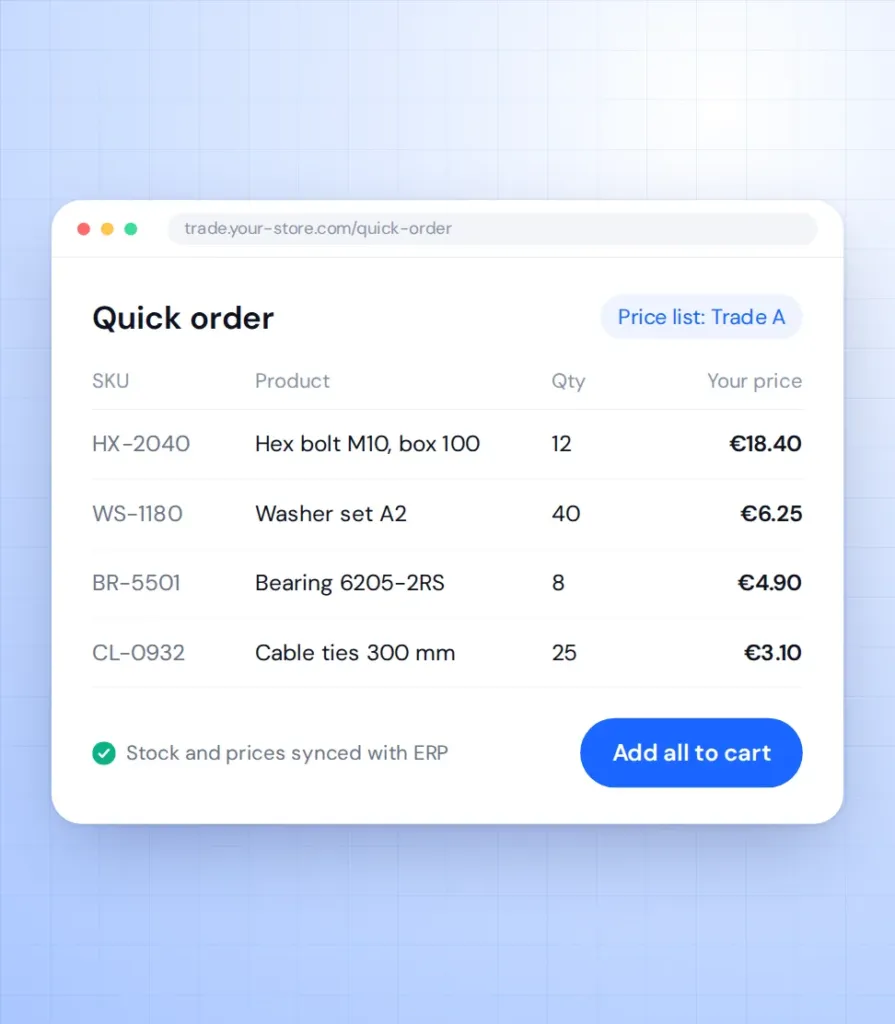
Stock, prices, customer-specific prices, orders and invoices synced with Odoo, NetSuite, SAP Business One, Microsoft Dynamics or 1C.
ERP integration -
Payments
Stripe, PayPal, Klarna and local gateways, including custom checkout flows.
Learn more -
Shipping and fulfilment
Carrier rates, labels and tracking from DHL, UPS, FedEx, ShipStation or your 3PL.
-
Marketing tools
Klaviyo, Mailchimp, Google Merchant Center, Meta catalogs and analytics events with clean data.
-
Custom APIs
Your own REST or GraphQL endpoints for apps, partners and internal tools.
Learn more
Stores we've built. Results
they've driven.





Integration price guide
The price depends on the API, data volume and sync direction; you get a fixed quote before we start.
-
Single integration
For one system with a standard API, such as a CRM or email tool.
from $2,500 2-4 weeks
- Field mapping workshop
- One-way or two-way sync
- Error log and alerts
- Staging tests
-
Most popular
Business integration
For ERP, stock and order sync in a live WooCommerce store.
from $6,000 4-8 weeks
- Products, stock, prices and orders
- Queues for large catalogs
- Retries and conflict rules
- Sync dashboard in admin
- Monitoring after launch
-
Integration layer
For several systems, custom APIs or middleware between them.
from $15,000 8-12 weeks
- Architecture and data model
- Custom REST or GraphQL API
- Several systems in one flow
- Load testing
- Documentation for your IT team
Prices are a guide. You get a fixed quote after a free discovery call.
Connector, automation or custom?
Three ways to connect WordPress to other systems, and where each one fits.
| Ready-made connector | Zapier or Make | Custom integration | |
|---|---|---|---|
| Setup time | Hours | Days | Weeks |
| Custom fields and logic | Limited | Partly | Yes |
| Large catalogs and volume | Often slow | Costly per task | Built for volume |
| Error handling and retries | Basic | Basic | Full, with logs |
| Monthly fees | Licence | Per task | Hosting only |
| Best for | Standard setups | Simple flows | Core business data |
How we integrate
-
Discovery
We review the APIs, map fields and agree sync rules, scope and price. 1-2 weeks. -
Prototype
A test connection on staging with sample data confirms the API behaves as documented. About 1 week. -
Build
Sync logic, queues, logs and admin screens, demoed on staging every week. 2-8 weeks. -
Test and launch
Tests with real data volumes, then a controlled switch with a rollback plan. -
Support
Monitoring and fixes when an external API changes, on a monthly plan.
What our clients say





Read before you decide
Practical guides from our team. Useful even if you never hire us.
-
WooCommerce ERP Integration: Odoo vs NetSuite vs SAP Business One
A practical guide to connecting WooCommerce with Odoo, NetSuite or SAP Business One. What to sync, which system owns which data, and how to build it.
Read the guide -
Headless WooCommerce: When It Is Worth It and When It Is Not
Most WooCommerce stores should not go headless. Here is when it pays off, what breaks, what it costs, and the cheaper options that often get you there.
Read the guide
Integration FAQ
Answers to the questions IT and operations teams ask most.
What do WordPress API integration services include?
Field mapping, sync logic, error handling, logs and monitoring. We connect WordPress or WooCommerce to CRM, ERP, payment, shipping and marketing tools.
Can you integrate a system with no public API?
Often yes, through file exports, a database connection or a small middleware service. We check the options during discovery.
Real-time or scheduled sync?
It depends on the data. Orders and payments usually sync in real time through webhooks, while large catalogs sync on a schedule to keep the site fast.
What happens when the external API changes?
Logs and alerts show the failure quickly, and our support plan covers updating the integration.
Will the sync slow down our store?
No. Heavy jobs run in background queues, not during page loads or checkout.
Is customer data safe?
We use API keys with minimal permissions and encrypted connections, and we sync only the data the flow needs, in line with GDPR.
