



 WhatsApp
 Zen Cart to WooCommerce Migration





- 5.0 Rating on Clutch, 35 reviews
-
120+ Projects launched
-
90+ PageSpeed score as standard
-
Weekly Demos on a staging site
-
Fixed Scope and price before start
When Zen Cart shows its age
-
01
A dated admin
The Zen Cart admin looks and works like software from another decade. New staff take long to learn it.
-
02
Manual add-on installs
Plugins often mean copying files and merging code by hand. Every add-on makes the next upgrade riskier.
-
03
PHP compatibility issues
Older Zen Cart versions break on current PHP. Staying on old PHP means security risk and hosting trouble.
-
04
Few modern templates
Mobile-friendly templates are few and often outdated. A good mobile experience usually means a custom build anyway.
-
05
A small developer pool
Fewer developers work with Zen Cart each year. Finding help for a change or fix takes longer and costs more.
-
06
SEO needs add-ons
Clean URLs need extra modules, and default URLs like index.php?main_page= are hard to manage for SEO.
What we migrate from Zen Cart
-
Products and attributes
Zen Cart attributes with price and weight changes become WooCommerce variations or add-on fields, with SKUs and stock.
-
Categories and linked products
Multi-level categories move intact. Products linked to several categories keep all their placements.
-
Customers and passwords
We move the password hashes and add a login check that accepts them, so customers keep their passwords. Unreadable hashes get a reset email.
-
Orders and history
Orders move with items, totals, addresses and status history, linked to each customer account.
-
URLs, EZ-Pages and SEO
Default and SEO add-on URLs get 301 redirects. EZ-Pages become WordPress pages, and meta data is kept.
-
The full migration service
Payments, shipping rules and taxes are rebuilt. See how we plan every move on our migration page.
Learn more
Stores we've built. Results
they've driven.





Zen Cart migration pricing
Final price is fixed after a free audit of your store, before any work starts.
-
Small store
For a Zen Cart store with a simple catalog and a standard theme.
from $1,500 2-4 weeks
- Up to 1,000 products
- Customers and order history
- 301 redirects for all URLs
- Password hashes moved
- EZ-Pages moved
-
Most popular
Growing store
For stores with variants, custom fields and a few key integrations.
from $3,500 4-6 weeks
- Up to 10,000 products
- Standard theme adapted to your brand
- Attributes to variations
- Mobile-first design
- Weekly demos on staging
-
Large store
For large catalogs, custom logic and ERP or CRM connections.
from $7,000 6-10 weeks
- 10,000+ products
- ERP or CRM integration
- Custom add-on logic rebuilt
- ERP or accounting sync
- Post-launch SEO monitoring
Prices are a guide. You get a fixed quote after a free discovery call. A new custom design is priced separately (see the cost calculator).
Zen Cart vs WooCommerce
Both are open source; WooCommerce is where the tools and developers are today.
| Zen Cart | WooCommerce | |
|---|---|---|
| Admin interface | Dated, slow to learn | Modern WordPress admin |
| Installing add-ons | Manual file merges | Install and update in admin |
| Mobile templates | Few, often outdated | Any design, mobile first |
| SEO URLs | Need an add-on | Built in |
| Content pages | Basic EZ-Pages | Full WordPress CMS |
| Developer pool | Small | Large |
How the migration works
-
Audit
We review your Zen Cart data, apps and URLs, including every hand-installed add-on, and agree a fixed scope and price. Takes 2-5 days. -
Test import
We run a full test migration to a staging site so you can check products, customers and orders. Usually done in the first week. -
Build
We rebuild the design and features in WooCommerce with custom Gutenberg blocks, with weekly demos. Takes 1-8 weeks depending on size. -
Launch
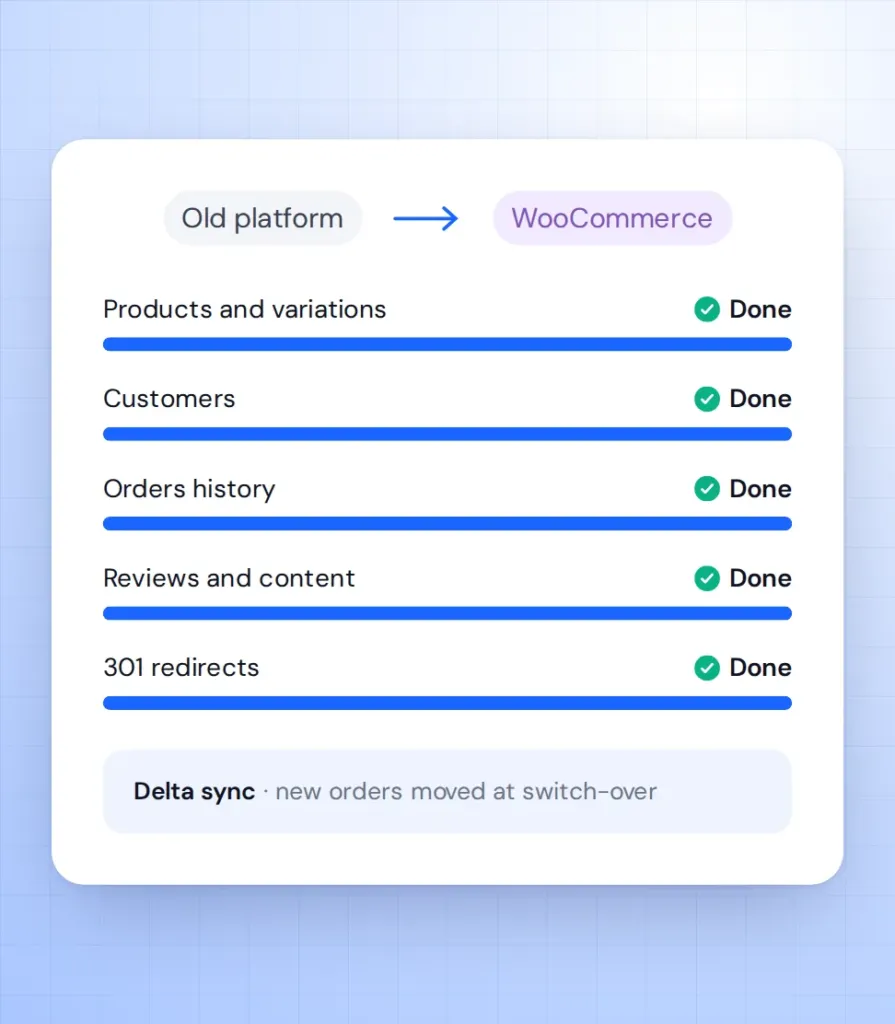
We sync new orders and customers, switch on 301 redirects and move the domain. Zen Cart stays live until the switch, so no orders are lost. -
Support
We watch orders, speed and Search Console in the weeks after launch. Then you can move to a monthly support plan.
What our clients say





Zen Cart migration FAQ
Answers for Zen Cart owners ready to modernize.
How long does a Zen Cart to WooCommerce migration take?
A small store with up to 1,000 products takes 2-4 weeks. Larger catalogues take 4-10 weeks. You get a fixed timeline after the audit.
Will customers keep their passwords?
In most cases, yes. We move the Zen Cart password hashes and add a login check that accepts them. Anyone whose hash cannot be read gets a reset email.
My Zen Cart is very old. Can you still migrate it?
Yes. We read the data straight from the database, so the Zen Cart version matters less than the data inside.
How do Zen Cart attributes move?
Attributes that change price or stock become variations. Text and file fields become product add-on fields.
Will my rankings drop?
Not if every URL is redirected. We 301-redirect default and SEO add-on URLs and keep your meta data.
Will WooCommerce be easier to run?
Yes. Add-ons install and update from the admin, and your team edits pages with Gutenberg blocks.
